Connect a Google calendar
Share your Google calendar's free/busy time with your Zella account. Busy times block booking right away. About 5 minutes.
If your own calendar is a Google calendar, share it with your Zella address as free/busy only. Zella then sees when you're busy, never what your events are. You need a computer and about 5 minutes.
Part 1: share your calendar (in your personal Google account)
- Go to calendar.google.com, signed in with your personal Google account.
- Under My calendars, hover over your calendar, click the three dots, then Settings and sharing.
- Under Share with specific people or groups, click Add people and groups and type your Zella address.
- Change Permissions to See only free/busy (hide details). Google suggests "See all event details", so change it.
- Click Send. Use more than one calendar? Repeat for each one.
Part 2: accept it (in your Zella account)
- Go to mail.google.com signed in as your Zella address. To switch, click your profile picture and pick your Zella account.
- Open the email from Google saying your calendar has been shared with you, click Join shared calendar, then Add.
Part 3: check it in Zella Life
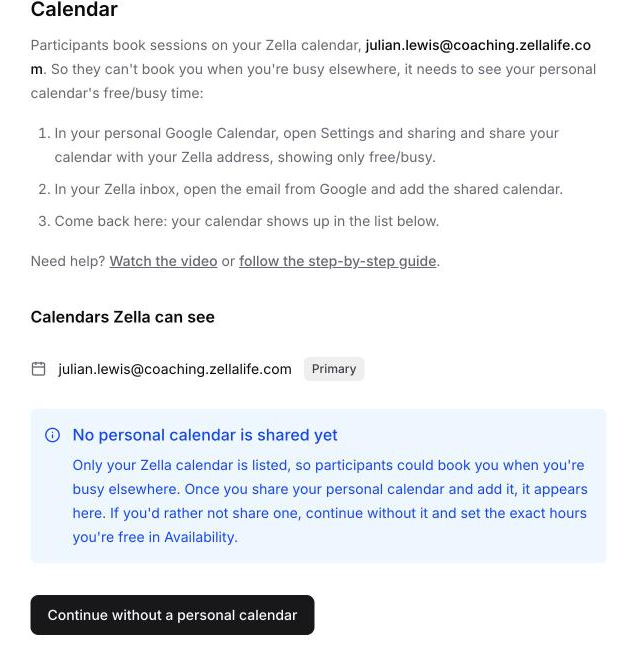
- Go back to the Calendar step in Zella Life (or Availability, if your setup is done). Your calendar now appears under Calendars Zella can see. If it isn't there yet, refresh the page.
- During setup, click Confirm calendar.
Note
If only your Zella address is listed, Zella can't see your calendar yet: go back to Part 2. The button then reads Continue without a personal calendar; only use it if you don't want to share one.
Part 4: see your Zella sessions in your own calendar (recommended)
This is the other direction: your own calendar shows a busy block whenever a participant books you, so you don't double-book yourself.
- Go to calendar.google.com signed in as your Zella address.
- Open your Zella calendar's Settings and sharing, click Add people and groups and type your personal address. See only free/busy is the only option, because session details stay in Zella.
- Click Send. In your personal Gmail, open the share email, click Join shared calendar, then Add.
Google's own steps: Share your calendar with someone.