Book a session
Pick a time with your coach, shown in your own time zone. You get a confirmation email and a calendar invitation with the meeting link.
Once you're matched, we email you an introduction to your coach. When your cohort has started, you can book your first session, your intro session.
Book a time

- Sign in and click Book a session on your Sessions page.
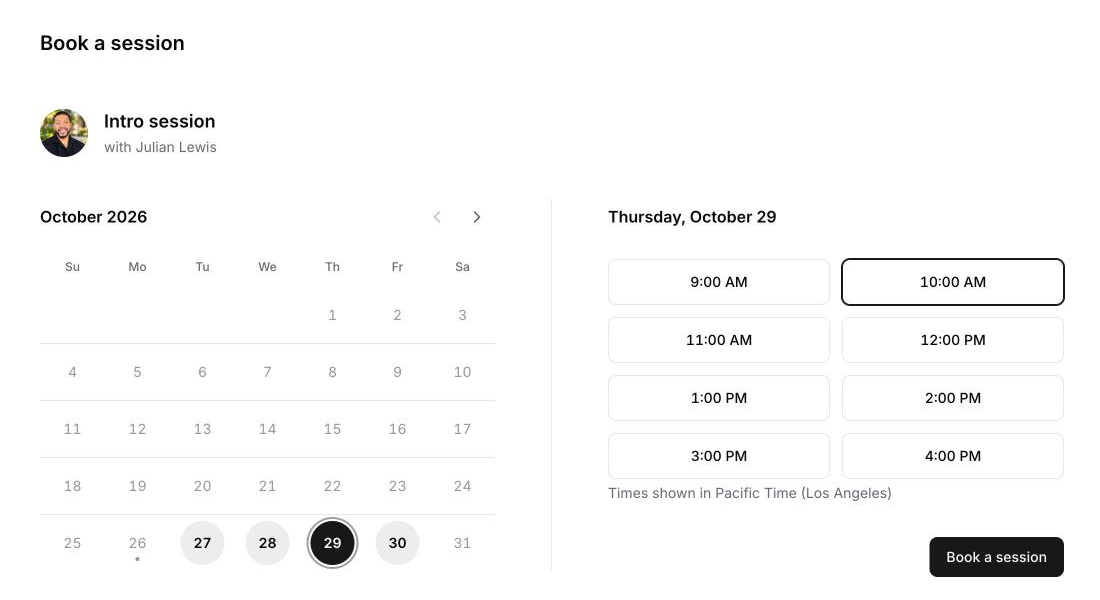
- Pick a day. Days with open times are highlighted.
- Pick a time and click Book a session.
About the times
- Times are shown in your time zone, named under the list of times.
- Sessions last 50 minutes and start on the hour. Your calendar invitation holds the full hour.
- You can book from 24 hours to 60 days ahead, up to your cohort's end date.
- If a day isn't highlighted, your coach has no open times that day.
What happens next
You land on the session's page. We email you a confirmation with a View session button, and a calendar invitation arrives from your coach's Zella calendar with the Google Meet link. See Join your session.
How many sessions you can book
- You book one session at a time. Book the next one once the last one is over.
- After each session, share your feedback before you book the next one.
- Your cohort includes a set number of sessions, with a limit each month. Sessions you don't use in a month carry over.
Note
No times showing? Your booking page explains why. See "Why can't I book a session?" in the guides.